> ## Documentation Index
> Fetch the complete documentation index at: https://docs.dubot.ai/llms.txt
> Use this file to discover all available pages before exploring further.
# How Dubot works
> A technical model for turning customer intent into controlled product action
Dubot sits between a customer request and the product experience. It translates intent into a known set of building blocks, operates through an approved surface, and checks whether the expected result occurred. If you have not read the [object model](/concepts/object-model), start there: actions, pages, knowledge, and journeys are grouped into capabilities and given to an agent.
## Current configuration view
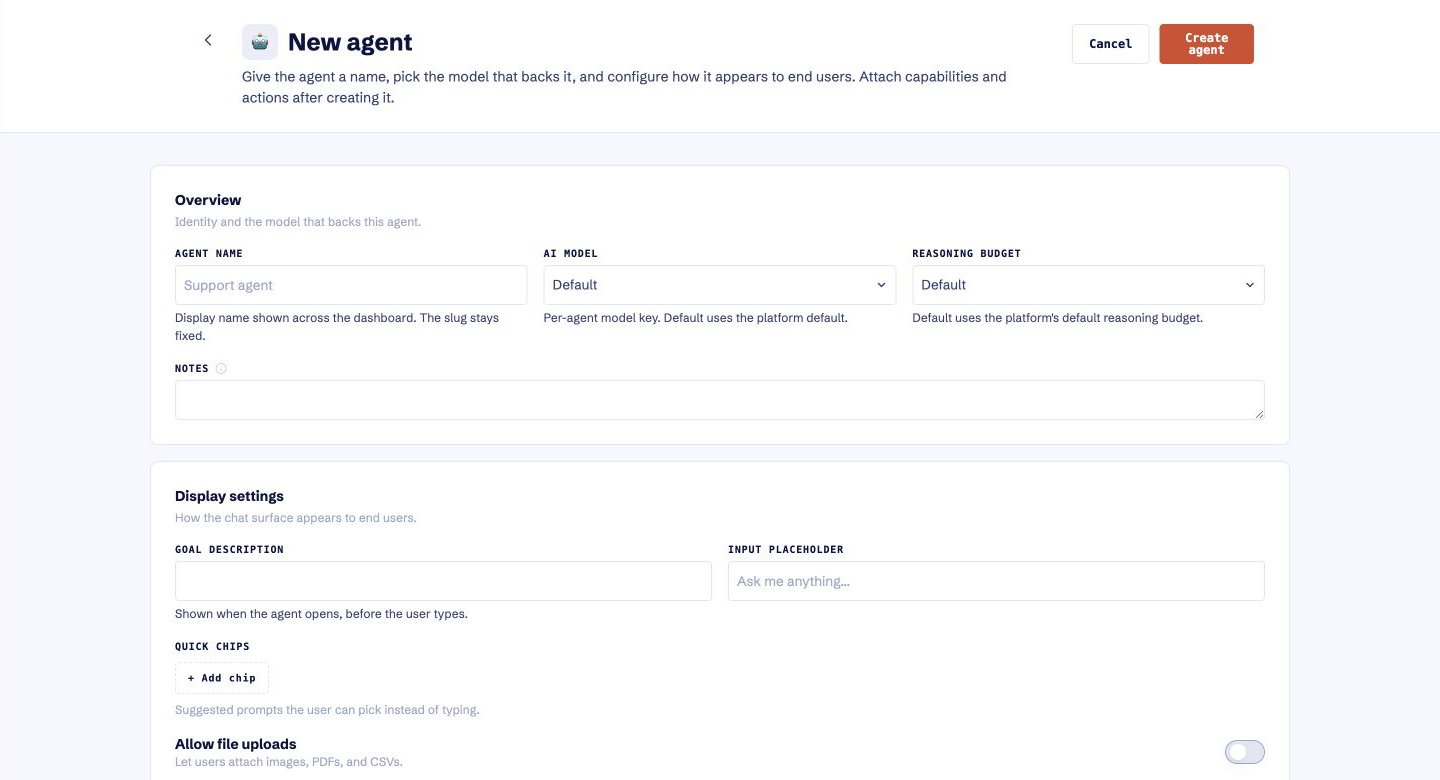
The current Dubot app lets a team configure an agent's model, reasoning budget, and customer-facing behavior. Capabilities and actions are attached after the agent is created. This is the configuration plane, not a Browserbot execution surface.
 ## The action loop
A support AI, agent, or in-product surface passes the customer request and the context needed to act.
Dubot matches the request to a capability the business has reviewed. If no suitable action or journey exists, it stops or falls back rather than improvise a new write.
Dubot evaluates the current product state, the allowed scope, and any required confirmation before continuing.
When an approved action exists and is reachable, Dubot performs it. When it does not, Browserbot or the contextual sidepanel guides the customer to the right place and shows them the next step.
Dubot checks for the expected state change and reports whether the request was completed, needs attention, or could not continue safely.
## Runtime model
Two ideas shape how Dubot behaves once a request is approved.
Whether Dubot acts or guides is decided at runtime, not fixed in advance. If the approved action is available it runs; otherwise Dubot navigates the customer to the right screen and shows them the step. The customer is never left at a dead end.
Navigation targets are stored as intent, such as "the settings link in the primary navigation," and resolved against the live interface at runtime by a fast model, with resolutions cached and retried. This avoids brittle stored selectors that break when a product's markup changes.
The runtime model describes intended behavior. The contextual sidepanel and runtime knowledge retrieval are in active development.
## Control model
Dubot is designed around bounded, approved building blocks rather than open-ended control.
| Control | What it answers |
| ------------------- | ---------------------------------------------------------- |
| Approved capability | Is this customer outcome supported? |
| Action policy | Should this step act automatically, confirm, or never run? |
| Product state | Is the interface in the expected condition? |
| Completion signal | How do we know the intended result occurred? |
| Failure behavior | What happens if Dubot cannot proceed confidently? |
Exact runtime, identity, data handling, and audit behavior must be confirmed for each customer environment. This page describes the intended control model, not a universal deployment contract.
## Current status
Agent configuration, attaching capabilities and actions, knowledge ingestion, Browserbot-based interaction, explicit approval points, and outcome verification can be evaluated with a focused first use case.
The contextual sidepanel, runtime knowledge retrieval, reusable governance controls, and support-platform connection patterns are in active product development.
General availability, a public API, prebuilt connectors, deployment models, and formal compliance claims are not implied by this documentation.
## The action loop
A support AI, agent, or in-product surface passes the customer request and the context needed to act.
Dubot matches the request to a capability the business has reviewed. If no suitable action or journey exists, it stops or falls back rather than improvise a new write.
Dubot evaluates the current product state, the allowed scope, and any required confirmation before continuing.
When an approved action exists and is reachable, Dubot performs it. When it does not, Browserbot or the contextual sidepanel guides the customer to the right place and shows them the next step.
Dubot checks for the expected state change and reports whether the request was completed, needs attention, or could not continue safely.
## Runtime model
Two ideas shape how Dubot behaves once a request is approved.
Whether Dubot acts or guides is decided at runtime, not fixed in advance. If the approved action is available it runs; otherwise Dubot navigates the customer to the right screen and shows them the step. The customer is never left at a dead end.
Navigation targets are stored as intent, such as "the settings link in the primary navigation," and resolved against the live interface at runtime by a fast model, with resolutions cached and retried. This avoids brittle stored selectors that break when a product's markup changes.
The runtime model describes intended behavior. The contextual sidepanel and runtime knowledge retrieval are in active development.
## Control model
Dubot is designed around bounded, approved building blocks rather than open-ended control.
| Control | What it answers |
| ------------------- | ---------------------------------------------------------- |
| Approved capability | Is this customer outcome supported? |
| Action policy | Should this step act automatically, confirm, or never run? |
| Product state | Is the interface in the expected condition? |
| Completion signal | How do we know the intended result occurred? |
| Failure behavior | What happens if Dubot cannot proceed confidently? |
Exact runtime, identity, data handling, and audit behavior must be confirmed for each customer environment. This page describes the intended control model, not a universal deployment contract.
## Current status
Agent configuration, attaching capabilities and actions, knowledge ingestion, Browserbot-based interaction, explicit approval points, and outcome verification can be evaluated with a focused first use case.
The contextual sidepanel, runtime knowledge retrieval, reusable governance controls, and support-platform connection patterns are in active product development.
General availability, a public API, prebuilt connectors, deployment models, and formal compliance claims are not implied by this documentation.